¶ Plasma arc and torch height control
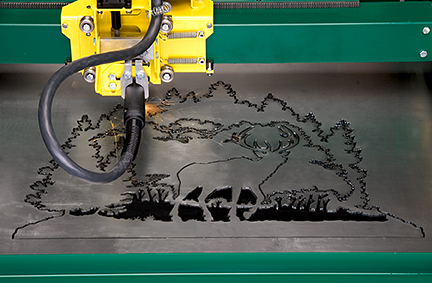
This is a great CNC plasma resource Linux CNC Plasma Primer
¶ Plasma Spindle
Note: This is only for plasma cutters with an arc OK signal
- Turn on the plasma with
M3(S Values are not needed) - It will wait for an arc OK signal. It will timeout and alarm after a specified time limit.
- It will then allow motion to proceed.
- M5 will turn off the plasma.
- arc ok is continuously monitored when the spindle is in M3 mode and sends an alarm if it goes away
¶ Config file
PlasmaSpindle:
  enable_pin: gpio.12
  arc_ok_pin: 'gpio.36:low'
  arc_wait_ms: 3000
  tool_num: 0
  speed_map: 0=0.00% 1=100.00%
  off_on_alarm: true
  atc:
  m6_macro:
  s0_with_disable: false
  disable_with_s0: true
¶ Important Config items
- enable_pin:
- Type: Output Pin
- Range: gpio or i2so
- Details: This is used to to tell the plasma to turn on.
- arc_ok_pin:
- arc_wait_ms:
- Type: Integer (milliseconds)
- Range: 0 to 3000
- Default: 1000
- Description: After the plasma is enabled, it will wait this long for an arc ok signal. If the time runs out it will generate an alarm.
- off_on_alarm:
- This should be set to true if you want to turn off the arc on alarms. The machine will be put in M5 mode when an alarm occurs.
¶ Torch surface probing
You could use normal probing with a floating Z or Ohmic sensor (contact)
¶ Reading Arc voltage
The native analog input circuits on the ESP32 are not very good. We don't think they would work well for this. We also don't like the idea of such a direct connection to such a noisy device is a good idea.
¶ THC (Torch Height Control)
¶ Proma SD style (controls Z)
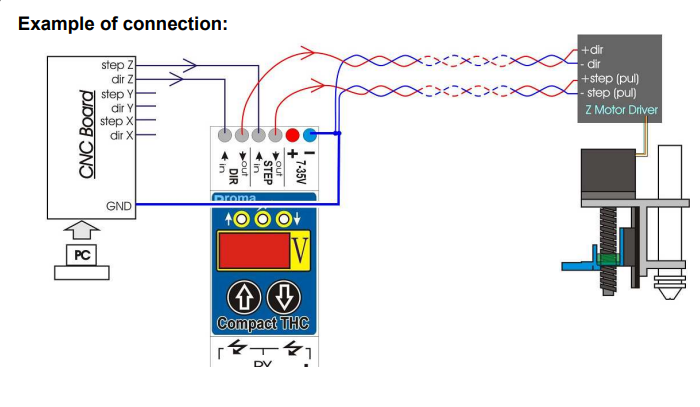
Use an external THC that controls the height while cutting and lets FluidNC control it when not cutting.
¶ Z Up down signals
Some THCs send up/down signals to the controller and the controller takes care of the Z motor steps. We do not support this yet.
¶ THC anti dive feature ideas.
Notes Only: This is not yet supported in FluidNC.
When the machine slows for a corner, small feature or end of cut, the plasma voltage may change due to the slower speed. To prevent the THC from incorrectly compensating for this, the controller can inform the THC of the slow down to disable the THC compensation. This is typically a digital signal.
FluidNC might be able to use the spindle rate adjusted feature, like in laser mode,to generate that signal on a pin like the standard output_pin. When rate adjustment kicks in or reaches a level, the pin could be activated.
If you want this feature be prepared to donate heavily to the project. This would be quite a bit of work and the devs do not have any plasma hardware to test on.
¶ Gcode
- THC will only be on during G1/G2 and G3 modes.
- You can use either M3 or M4 modes. See the laser spindle to see how this works. Basically in M4 mode the output_pin will be off when the motion stops, regardless of the current S value.
Here is a sample of the gcode.
G01 Y19.00 S1 ; turn on THC
G01 Y20.00 S0 ; turn off THC
¶ Why not have FluidNC do everything?
The firmware would very complicated. You have gcode that says cut this path at this height. This goes into a complex motion planner to keep it smooth and fast and starts that motion.
During that motion you have a real time activity monitoring the arc voltage. If that voltage changes you need to change that plan in real time without affecting the quality of the motion.
That is a constantly changing situation and you really need a PID algorithm, like the temp on a printer hot end, to prevent overshoot and get there as fast as possible..
Unlike a hot end, you cannot just slam on the heater when you are far from the the target. The whole time you also need to respect the acceleration and speed limitations of the motor.
It is not impossible to do of course and we have discussed methods many times, but not a priority at this time. We would need a bunch of users to show they are really interested in this by sponsoring it.
¶ GCode and Postprocessors
This is a proposed Gcode example. is a simple job of cutting 2 squares. This assumes you have homed and set the work X0 and Y0 before starting the job.
M3starts the plasma and waits for an arc OK signal- A THC takes care of the Z when plasma is on.
- Z axis has a homing (up) switch and a floating Z switch to find the material top.
G17 ; XY Plane
G21 ; set units
G54 ; set coordinate system
G90 ; set absolute position mode
M6 T1 ; optional. Select spindle and tool
G0 Z20 ; go to rapid move height
G0 X10.0 Y10.0 ; move to first cut
; first cut
G38.2 G91 F300 Z-100 P20 ; Floating Z. Probe in relative position and set 0 position
G90 ; set absolute position mode
G0 Z3.0 ; move to arc start position
M3 S1 ; start plasma, S value is optional and not used.
G4 P0.5 ; pierce time
; start cut
F1000 ; set cutting feedrate
G1 Y60
X60
Y10
X10
M5 ; turn off plasma
; cut done
G0Z20 ; return ro rapid height
G0X110.0 Y110.0 ; move to second cut
; second cut
G38.2 G91 F300 Z-100 P20 ; probe in relative position and set 0 position
G90 ; set absolute position mode
G0 Z3.0 ; move to arc start position
M3 ; start plasma
G4 P0.5 ; pierce time
; start cut
F1000 ; set cutting feedrate
G1 Y160
X160
Y110
X110
M5 ; turn off plasma
; cut done
G0 Z20 ; return ro rapid height
G53 G0 Z-1 ; move to top of Z
M30
¶ Troubleshooting
This is what you will see if send M3 and the plasma cutter does not send the arc_ok signal.
Grbl 3.9 [FluidNC v3.9.4 (PlasmSpindle-ae36fe45) (wifi) '$' for help]
M3
[MSG:ERR: PlasmaSpindle failed to get arc OK signal]
ok
[MSG:INFO: ALARM: Spindle Control]
ALARM:10
This is what it should look like if you activate the arc_ok signal right after the M3.
M3
ok
This is what it should look like if you activate the arc_ok signal right after the M3 and then release the arc_ok
M3
ok
[MSG:INFO: ALARM: Abort Cycle]
ALARM:3