¶ Greyhound 6x-S3 Controller
The first set of controllers are in production and due in early November 2026.
¶ Overview
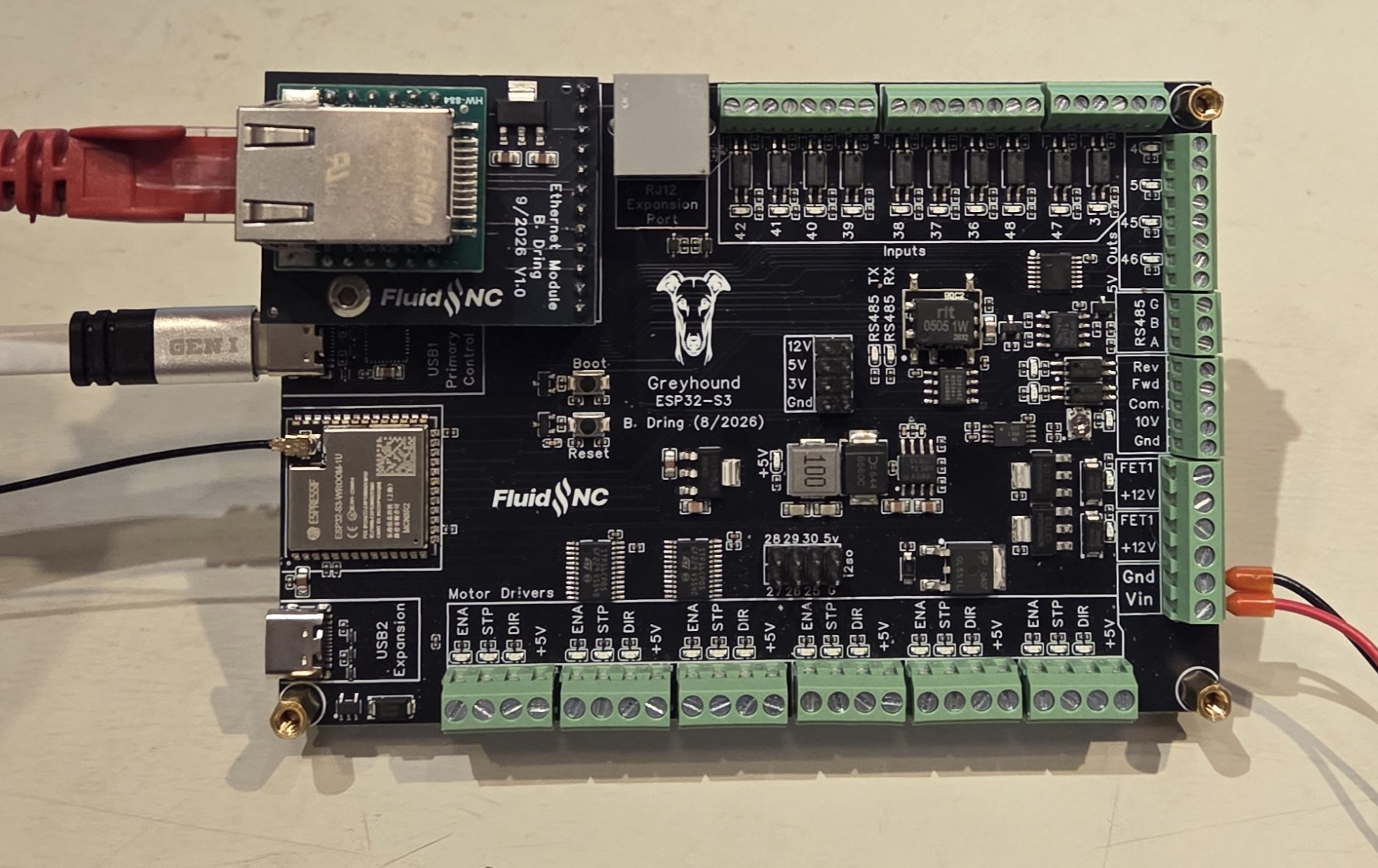
This is the second generation of the popular 6x controller. This uses the ESP32-S3-WROOM-1U-N8R2 MCU to gain a few extra pins and features plus 2Meg of extra RAM.
This is designed for people who prefer screw terminals over crimp connectors. If you prefer connectors, I suggest the very similar Doberman controller.
¶ Features
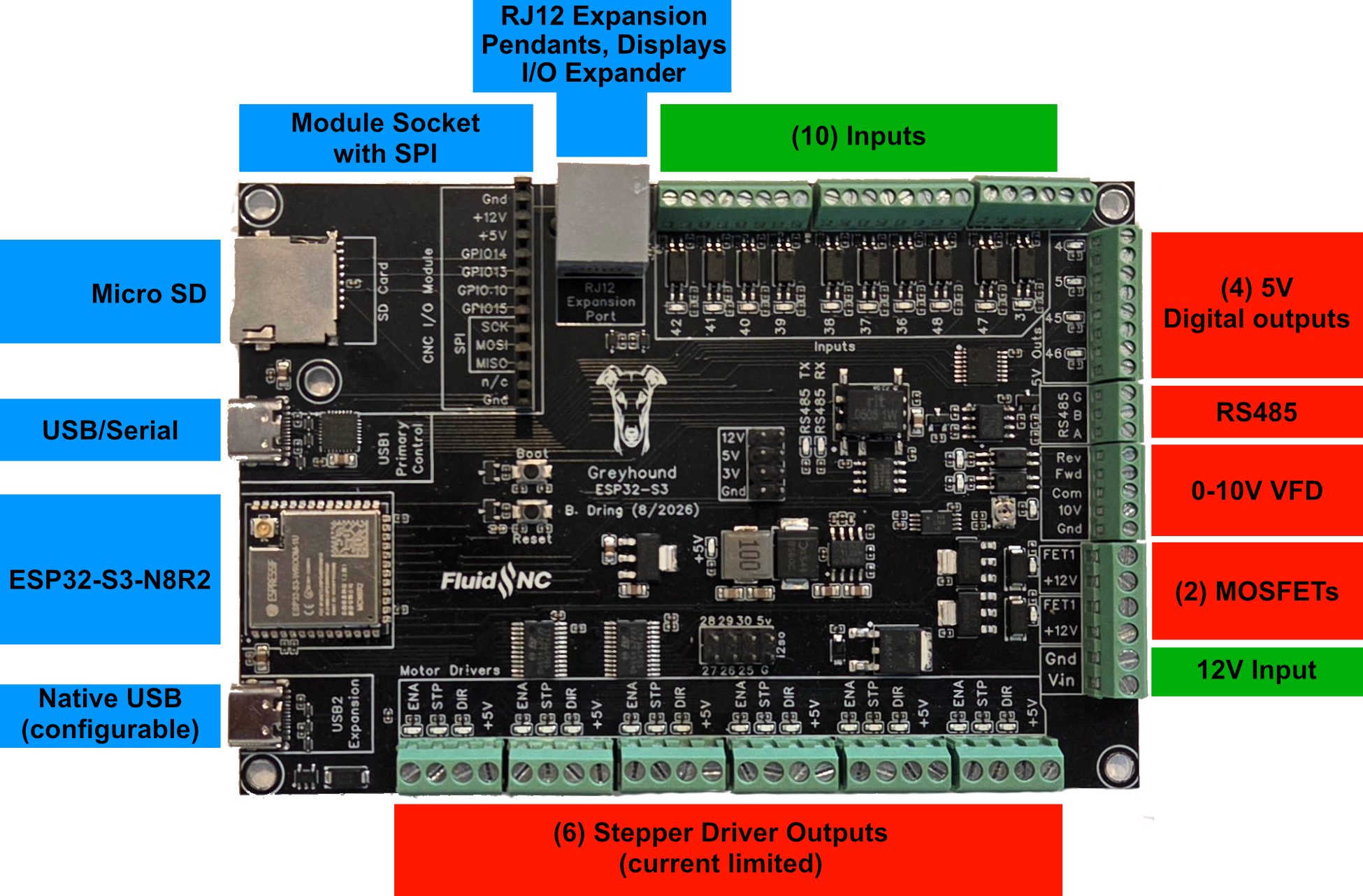
- (6) Motor connectors for external stepper drivers. Each motor has separate step, direction and enable signals. LEDs are on each signal to help with setup.
- (10) Inputs for switches (limits, probes, control)
- (2) 3A MOSFETs to drive relays, solenoids and valves.
- (4) 5V Output signals with PWM capability
- Micro SD card socket for local storage of gcode files
- CNC I/O Module socket for added I/O and advanced features like wired Ethernet
- RJ12 expansion connector for I/O expanders, displays and pendants.
- (2) USB-C connectors
- The primary one is a USB to serial adapter to connect to gcode senders and programmers.
- The secondary one is a native USB interface to the ESP32.
- Spindles (many types supported). Multi-spindle arrangements are possible like RS485 & laser on the same machine.
- Isolated RS485 circuit for VFD Spindles
- 0-10V controlled spindles with additional forward and reverse direction signals
- PWM Speed controllers with optional separate enable signals
- Relay (on/off) controlled spindles.
- BESC (Brushless Motor) based spindles
- Lasers with PWM and enable
- Reverse voltage protection on the input voltage.
¶ Where to buy it
Elecrow coming soon.
¶ Getting Started
The controller ships with a version of FluidNC that was current when the controller was built. You should upgrade the firmware using the web installer.
- Do not install your config file yet.
- Do not connect any external devices yet.
- Connect the antenna. You should only operate when the antenna is connected. A missing antenna can cause the ESP32 chip to overheat.
- Connect main power. Be sure the polarity is correct before you turn on the power.
- Turn on the main power and confirm that the 5v LED (green, near the center of the PCB) is lit.
- Connect a USB-C cable between your computer and the controller. Use the USB connector labeled USB1 . Check to see that your computer has added a serial port.
- Go to the web installer. Connect to your controller.
- Click the button to open the terminal. Enter the command $localfs/run=test.nc. This should sequencially blink all of the I/O test LEDs on the controller.
- Do an upgrade (not full installation).
- You may want to connect to your wifi at this time.
- Open the configuration wizard on your browser, select the greyhound controller and create a config file.
- Power down and connect all your devices. It might be helpful to connect just a few at a time and test as you go.
¶ Config Files
It is strongly recommended that you use the configuration wizard to create config files. You can see a demonstration video here.
¶ Power
The controller should be powered by 12V. Your power supply should be able to provide about 1A for the basic controller functions plus whatever current is attached to the MOSFET terminal. The terminal block is rated for 10A. It should be connected to the "Vin" pins on the green terminal block. Double check the polarity before powering on, but there is reverse polarity protection.
A green LED will light in the center of the conntroller when power is properly applied. Depending on the state of the controller other LEDs may also light or blink.
You cannot power the controller with either USB connector. Nothing will work until the primary power connected for anything to work including USB.
¶ ESP32 Chip Type
It is an ESP32-S3-WROOM-1U-N8R2.
- 1U = Antenna connector rather than a built in one.
- N8 = 8 MB Flash
- R2 = 2 MB (Quad SPI) PSRAM
¶ ESP32 Antenna
The antenna connector is an IPEX connector type. It ships with a basic one like this. You can easily find larger or more directional ones on Amazon or AliExpress. You should always have an antenna connected when using the Wifi or Bluetooth modes.

¶ USB
¶ Primary (USB1)
The primary USB-C connector (upper one) is used for the basic interface of the controller. It creates a COM port on your computer when it is connected and power is on. It is used for programming and connecting gcode senders.
¶ Secondary (USB2)
This feature is experimental at this time
The other USB connector, labeled USB CDC, connects directly to the ESP32. By default this native USB will be a CDC (communication device class) USB/Serial UART. Most computers will already have a driver for this.
This USB can also work in host mode, where it can communicate and power devices like keyboards, joysticks, wire ethernet and jog controllers.
At this time FluidNC has no support for any devices in host mode. The connector was tested using simple example sketches of host mode. There is no guarantee that FluidNC will ever support this. This was just an attempt to future proof the controller and work as a development platform.
¶ SD Card
The micro SD card uses SPI and must be configured like this.
spi:
  miso_pin: gpio.2
  mosi_pin: gpio.1
  sck_pin: gpio.21

sdcard:
  card_detect_pin: NO_PIN
  cs_pin: gpio.9
¶ Motor Driver Terminals
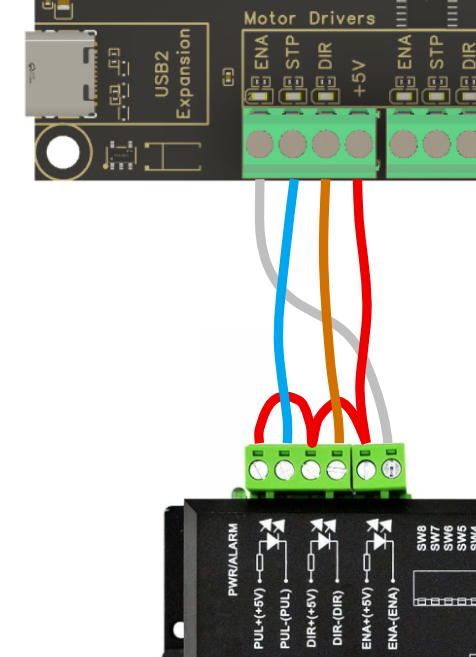
The motor drivers circuits use (2) STMicro STP16CP05 chips. These are constant current, LED sink driver, shift register chips. We use the Is2o feature of the ESP32 to output the shift register signals.
The constant current feature is setup for about 20mA. This means a 20mA or lower current will be driven constantly. This should be way more than the optos motors drivers use. This method was chosen to protect the pins from some accidental mis-wires, like a short to ground or a positive voltage. Anything attempting to pull more current will cause them to PWM to lower the average current, or shut off completely.
They sink current which means the signals must be connected to the minus side of the optos and the plus side should be connect to +5V. In the off state the pins are floating (not connected to any voltage)
Any usused signal, plus the extra 6 i2so pins on the 8 pin header connector, can be used as outputs to control other features. Keep in mind that these current sync to ground in the active state and float in the inactive state.
# motor 1
      standard_stepper:
        step_pin: I2SO.1
        direction_pin: I2SO.2
        disable_pin: I2SO.0

# motor2
      standard_stepper:
        step_pin: I2SO.4
        direction_pin: I2SO.5
        disable_pin: I2SO.3

# motor3
      standard_stepper:
        step_pin: I2SO.7
        direction_pin: I2SO.8
        disable_pin: I2SO.6

# motor4
      standard_stepper:
        step_pin: I2SO.17
        direction_pin: I2SO.18
        disable_pin: I2SO.16

# motor 5
      standard_stepper:
        step_pin: I2SO.20
        direction_pin: I2SO.21
        disable_pin: I2SO.19

# motor 6
      standard_stepper:
        step_pin: I2SO.23
        direction_pin: I2SO.24
        disable_pin: I2SO.22
¶ Closed loop motors
Most closed loop motor drivers can be used. See this wiki page for more details.
¶ Inputs
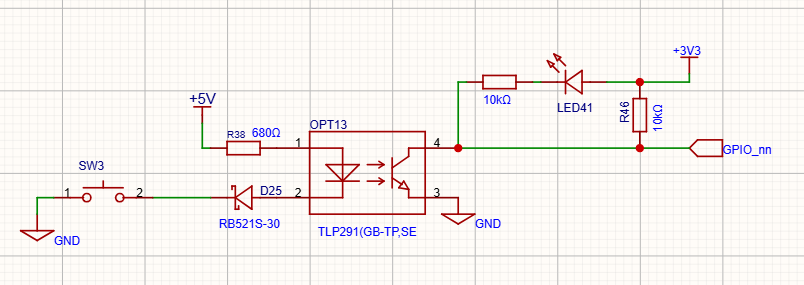
All inputs activate by closing the circuit to ground. You can use N.O. and N.C switch as long as one position closes to ground.
You can use electronic switches like proximity or inductive switches as long as the output signal switches to ground (typically called NPN). If the switches require external power you need to connect that elsewhere on the controller or an external power supply that shares a common ground.
All of the inputs have external pullup resistors. You do not need to add :pu in the config file.
For normally open switches you need the :low attribute on all inputs. Normally closed are active high. You can add the :high attribute, but it is not needed because that is default in FluidNC.
Here is the basic input circuit. SW# represents your switch.
¶ 5V Outputs
The 5V outputs are on the (4) 2 pin red connectors. They can do digital or PWM. They are driven by a 74AHCT125 chip. They can do 20mA each, but only 50mA in total for all 4 outputs.
The outputs are from left to right.
- gpio.4 (note this will also activate MOSFET1)
- gpio.5 (note this will also activate MOSFET2)
- gpio.46
- gpio.45
¶ Spindles
¶ 0-10V Spindle
This uses an op-amp and a low pass filter to create an analog voltage. It can be adjusted with a trim pot for a max voltage of 5V to 10V. Measure and adjust the voltage before connecting to your spindle speed controller. A good way to do this is to send the gcode for max spindle speed like (M3 S24000 or whatever your max is) and then adjust the pot until you get the desired max voltage. It is best to set the max voltage before connecting to your VFD.
Most VFDs have a 10V output. Do not connect this to the controller. Connect the 10V signal to the 10V input on the VFD.
The forward and reverse signals use opto to connect to a common ground. This ground needs to come from the VFD.

10V:
  forward_pin: gpio.7
  reverse_pin: gpio.8
  pwm_hz: 5000
  output_pin: gpio.6
  enable_pin: NO_PIN
  direction_pin: NO_PIN
  disable_with_s0: false
  s0_with_disable: true
  spinup_ms: 0
  spindown_ms: 0
  tool_num: 0
  speed_map: 0=0.000% 1000=0.000% 24000=100.000%
  off_on_alarm: false
If you are not using this type of spindle or are not using both FWD and REV, the FWD and REV circuits can be used to control other things, like directly drive a relay (24vdc max 45mA max).
¶ RS485
The RS485 circuit is fully isolated. It also has automatic direction control, so it does not use an rts_pin
There are LEDs to show and help debug communications issues.
- TX LED (labeled "485 Tx") You should see the TX blink a couple times per second. If you do not, something is wrong in your setup on the CNC controller side.
- Rx LED (labeled "485 Rx") The Rx should blink at the same rate (immediately after) as the Tx LED when communicating with the VFD. If the Rx LED stays on, try swapping the wires on the VFD side. If it does not light at all, there is probably a setup or other problem on the VFD side. Note: When no RS485 wires are connected the state of the LED is meaningless. Ignore that LED when not using RS485.
Note: The circuit is a UART to RS485 converter. The LEDs represent the state of UART side IO.
RS485 is a lot more complicated to setup than other types of spindles. It requires a lot of setup on the VFD side and good wiring. If you are having trouble, you should consider using the 0-10V method to control the spindle. It is very hard for us to support RS485 remotely.
¶ RS485 Wiring
You should use 22-24AWG wires that are tightly twisted with at least 1 twist per inch. You can also use a twisted pair from some CAT5/6 cable.
You generally do not need a shield over the wires. If you do use a shield it should be grounded at the Doberman side. Do not connect the ground on the Doberman side to the VFD. This will defeat the isolation feature of the circuit.
VFDs are very noisy devices, especially the cheap ones. Some people have persistent communication problems that cannot be fixed.
¶ RS485 Config File
Here is a typical RS485 config file section. You must also setup the VFD and get the wiring correct. For general information about VFD setup see the spindle wiki page.
For the my Huanyang, I connect the terminal labeled RS485 A on the controller to RS+ on the VFD and RS485 B on the controller to RS- on the VFD. Most people should not connect the ground terminal.
# Begin Huanyang
uart1:
  txd_pin: gpio.12
  rxd_pin: gpio.11
  baud: 9600
  mode: 8N1

Huanyang:
  uart_num: 1
  modbus_id: 1
  tool_num: 0
  speed_map: 0=0% 0=25% 6000=25% 24000=100%
  off_on_alarm: false
¶ Other Spindles
Use the 5V outputs to control PWM spindles and lasers. You can also use the 5V outputs for enables and direction signals.
¶ MOSFETs
The (2) NPN MOSFETs are rated for 3A continuous and 5A peak. There are flyback diodes connected to Vin to make them safe for use with inductive loads, such as relays and solenoids.
The MOSFETs share pins with (2) 5V outputs. If you are using the wizard, please assign the MOSFET beforee the 5V outputs so you know which 5v pins are still available.
The VMot terminals are always connected to VMot. Terminals labeled with the io pin numbers switch to ground when the io pins are active. If you need to operate devices with other voltages than VMot, you can use a separate DC power supply as long as it shares a common ground with the controller.
¶ RJ12 Expansion Port
Here is a config file example.
uart1:
  txd_pin: gpio.0
  rxd_pin: gpio.35
  rts_pin: NO_PIN
  cts_pin: NO_PIN
  baud: 1000000
  mode: 8N1

uart_channel1:
  report_interval_ms: 75
  uart_num: 1
¶ Airedale I/O Expander
See this page if you are using the the expansion port for an Airedale.
¶ CNC I/O Module Socket
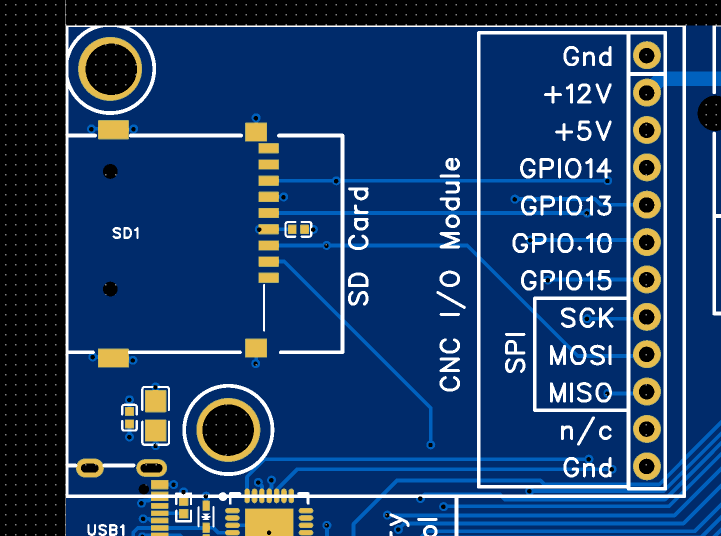
The expansion socket is compatible with all existing CNC I/O Module designs (4 I/O pins). It also adds (3) extra pins that are connected to the SPI bus that the SD card also uses.
¶ Wired Ethernet Module
You need to install a separately purchased ethernet module and install it like this.
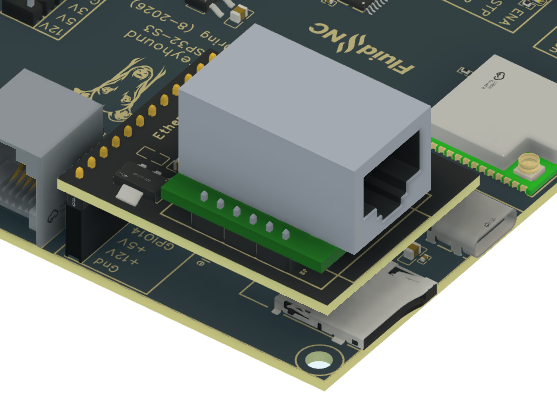
Here is what you need in the config file. See this wiki page on how to use wired Ethernet.
ethernet:
  cs_pin: gpio.14
  int_pin: gpio.13
  rst_pin: gpio.10
  phy_type: w5500
  phy_addr: 1
  frequency_hz: 1000000
¶ Source Files
¶ Pinout Reference
The config wizard is also very good way to determine the pin numbers.
¶ Errata and version info
- V0.9 Protototype issues
- There is no version number on the controller
- FETS are both labeled FET 1. In production they will be labeled FET4 and FET5 to match the gpio numbers they use.
- Minor misalignment of the module support hole.